Archive for the ‘Windows’ Category

The account used is a computer account. Use your global….

Thursday, July 25th, 2013

While scripting a report; I noticed a bogus error about a file version being wrong.

I examined the server in question and found the server service was not running.

I tried to start it but it stopped right away with the following message in the system event log.

The Server service terminated with the following error:
The account used is a computer account. Use your global user account or local user account to access this server.

Another server with the same problem would give this message:

Windows could not start the Server service on Local Computer Error: 1808: The account used is a computer account. Use your Global user account or local user account to access this server.

The service was configured correctly.

An odd problem and it’s cause was the fact a couple users placed URLs in the system Path variable (ie \\server\mount\dir).

Removing the entries and a reboot of the server corrected the issue.

You must be an administrator running a console session…..

Tuesday, July 9th, 2013

I was trying to debug a problem on a remote server through remote desktop.

I wanted to run a Windows File Protection scan (sfc) but was rewarded with:

You must be an administrator running a console session in order to use the sfc utility.

I looked at Microsoft and found this technote.

The resolution was was to run it locally as this was by design!!!!

I thought “Come on! I have to drive over to the machine!”

Then, I noticed “Applied To” and saw only Server 2000 listed.

Hmmm?  Administrator?…..

What would happen if I started a command window as a local administrator (right click the menu option and select run as administrator)?

Success!

Lesson of the Day:  Read the whole technote!

Windows 8.1 preview due in June.

Friday, May 31st, 2013

The update will be previewed in June and it looks like it will include the venerable start menu. It’s odd listening to the complaints over Win8. Sure it was disconcerting when I first installed it but I thought it was an “adventure” like in the old days when trying something new. Guess people these days want instant gratification and don’t have the patience to play with the OS and figure things out.

Metro is fine once you figure it out. The problem was the lack of touch screen monitors to really make use of it. That will change in time.

Many of the improvements listed in the article really mean nothing for me the corporate user as they are more for the home/mobile user.

What will be interesting is to hear the comments of the Win 8 users after we upgrade.

Microsoft Product Lifecyle

Thursday, May 23rd, 2013

One of the things that probably annoys Microsoft is how slow companies and people upgrade their products. Certain companies are even slower due to customer requirements.

From time to time; the question of how long will Microsoft support a product will be raised.

Luckily; Microsoft has provided a page to answer this question.

Simply, enter the product name and it will list out dates. Of course, expiration dates can be expended but you shouldn’t gamble on it.

Windows 8 to restore some classic features?

Thursday, April 18th, 2013

Windows 8 is getting labeled as the next Windows Vista.  I am not so sure it deserves that label.

People are lamenting it’s slow acceptance and are talking about the doom of the desktop and laptop to the great hopes of the Cloud evangelists.

I would argue the main problem with Windows 8 acceptance falls mainly on Windows XP.  It was a solid dependable operating system and companies and people are slow to change. Even today; some companies are in the process of migrating to Windows 7.  Other companies converted to Windows 7 in the last year or so and are not interested in starting a new conversion.

There is of course the lack of touch screen technology to make use of Windows 8 tile approach but in time that will change.

Probably the biggest shock when you first look at Windows 8 is the missing Start menu.  I have to admit to being a little lost when I first looked at the OS.  Some things are always expected and I would think Microsoft would have done a better job with the OS to allow for old familiar things to be brought back if the user wants them.

There are rumors Windows Blue will restore some old features. It has even been said this will restore PC purchases.

Time will tell.

Shutting down a workstation through remote desktop.

Wednesday, April 17th, 2013

Every once in awhile I come on a workstation which only has “Logoff” or “Disconnect” through remote desktop.

What to do when you want to reboot or shutdown?

There are a few ways to do this:

1) You can use the Alt+F4 keys to bring up a shutdown window which has the options for restart and shutdown.

2) You can use the Ctrl+Alt+End keys to bring up the old Ctrl+Alt+Del menu where you can select shutdown or restart

3) You can enter:  shutdown -s -t 10  to shutdown in 10 seconds or you can enter: shutdown -r -t 10 to restart in 10 seconds.

Keep in mind new operating systems will do things different such as the Ctrl+Alt+Del menu is different for windows 7.

One thing I find still works is the shutdown command.

Finally, I keep forgetting the Alt-F4 approach.  I was reminded of it here.


Counterspy Enterprise discontinued.

Wednesday, April 3rd, 2013

A major problem of IT people is the tendency to keep everything with the justification of “But I might need this some day!” I was cleaning my cube and found our old copy of Counterspy Enterprise. Keep or toss?

I did a quick check on the Net and found the product had been discontinued with a suggestion to upgrade it to Vipre Enterprise. Sounds nice but for two problems 1) The upgrade chance was two years ago.  2) My current company likes SEP.

Into the recycle bin it goes.

XP Support Countdown Clock

Tuesday, April 2nd, 2013

Found a little countdown clock provided by the people of Camwood in the UK.

Windows Certification time

Tuesday, March 19th, 2013

I dragged my feet for years on renewing MCSE. I wondered if it was really worth it? I have several training books and certification books which for all purposes are taking shelf space and gather dust.

I did ask around and found there are two basic arguments.

1) The main argument for getting MCSE for windows 2003 is HR and resume filtering. HR departments tend to be behind or simply don’t understand the IT field. Therefore, they look for catch phrases such as MSCE. It is also the last instance of Microsoft Certified Server Engineer.

The HR resume filtering argument is something to consider if you are starting your career.

If you like having the engineer label and it’s good for you to have a constant line of OS certs on your resume then by all means, get it.  Especially, if you are not worried about the cost and can pass it pretty quickly.

I am told however, the 2003 tests will retire this July.

2) The main argument against is the simple fact it’s old.  People are converting to 2008 so why bother?

A very valid consideration.  Especially, if you see your 2003 installs disappearing.  I learned long ago there is little value for being a master of a dead or dying Operating system.

Get an idea for how much 2003 is being used. Microsoft will keep the tests and certification around if the base is large. They tend to start retiring the tests and certifications about 10 or so years after the certification is introduced.

I am not concerned about 2003 anymore. I passed on obtaining the windows 2000 MSCE and found people weren’t bothered.  Probably, because I had converted a company from NT domains to Active Directory.

I have decided to “trail blaze” and go after the new certs for 2012.  Training material is limited and at this point in time. I have only found items for installing server 2012.

Some useful pages:

2008 or 2012

MCITP

Retired


Add a new product key to Windows 8 or Server 2012

Friday, March 15th, 2013

I had a request to add a purchased product key to a server running a trial version of server 2012.  We are still learning the new layout so of course the question was how?

A quick check found we could change it via a GUI.  There is the command line; but, I wanted to use the GUI.

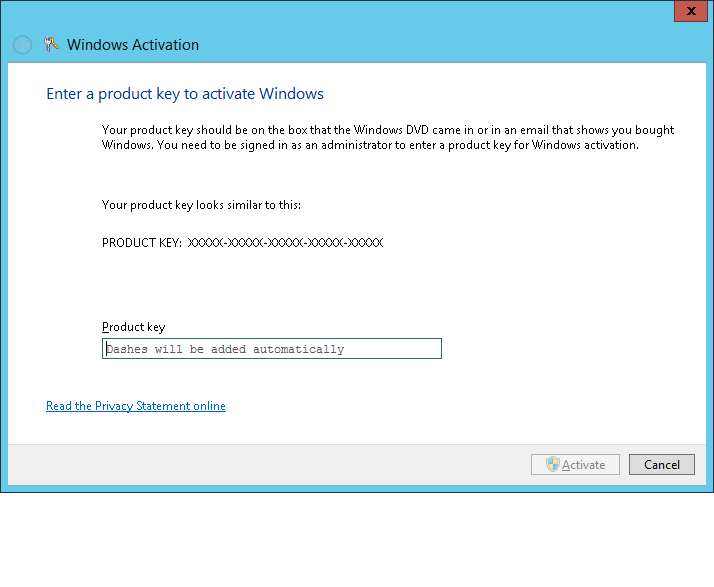
To change the license simply enter:

slui 3

This will bring up the following window:

activation

Simply cut and paste the new license, click Activate and the change will happen.