Java 0-day exploit counter

Thursday, March 7th, 2013

With the endless java vulnerability announcements; new sites and jokes have appeared.

Best joke I have heard “Just Another Vulnerability Announcement”

A nice little site which watches vulnerabilities and keeps a counter of days since last announcement is java-0day.com.

End of life for Windows XP

Wednesday, March 6th, 2013

People ask from time to time “When is Microsoft ending support for XP?”

They did announce end of life and then extended it.

Current date is 4/18/14.

People tend to be slow to migrate off and if there are enough people still using it, they will probably extend it.

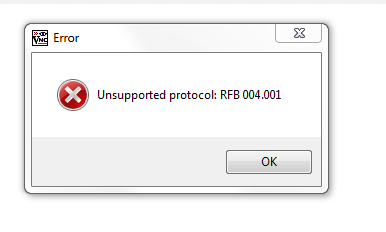
Unsupported protocol: RFB 004.001

Wednesday, February 27th, 2013

I had user who reported VNC didn’t work and he was receiving the following error:

Image

After looking the system over; I noticed both tightvnc and realvnc were installed and set with the server option.

Realvnc was removed and the most current version of tightvnc was installed. The error went away and use was restored.

Check speed and duplex of an Ethernet card with Redhat

Friday, February 22nd, 2013

How does one check the speed and duplex on a computer running Redhat?

A simple tool (if installed) called ethtool will give such information.

You will have to use a root to get this information.

# ethtool eth0
Settings for eth0:
Supported ports: [ TP ]
Supported link modes:   10baseT/Half 10baseT/Full
100baseT/Half 100baseT/Full
1000baseT/Full
Supports auto-negotiation: Yes
Advertised link modes:  10baseT/Half 10baseT/Full
100baseT/Half 100baseT/Full
1000baseT/Full
Advertised auto-negotiation: Yes
Speed: 1000Mb/s
Duplex: Full
Port: Twisted Pair
PHYAD: 1
Transceiver: internal
Auto-negotiation: on
Supports Wake-on: g
Wake-on: g
Link detected: yes

ethtool can also make changes but I have not had a need to do that yet.

The project file ‘ ‘ has been renamed or is no longer in the solution.

Friday, February 22nd, 2013

After an upgrade to Visual Studio 2012, a user reported this error while trying to build a project:

The project file ‘ ‘ has been renamed or is no longer in the solution.

It turns out VS2012 is a little more strict about missing references. Go through and clean them up and the build will work.

There was a forum note on MSDN as well.

Visual Studio 2012 hangs at splash page

Monday, February 18th, 2013

Migration to Visual Studio 2012 has started. We had a couple incidents of the upgrade hanging at the splash page.

Visual Studio 2012 Splash Screen

The previous version installed was 2010. Nothing obvious and there were no errors.

After digging around, it turned out to be the video drivers. They were upgraded and the install continued.

Maximum number of cpus supported by Windows 7

Monday, February 18th, 2013

I do get this question from time to time.

Windows 7 Home edition can support one physical CPU. Cores are dependent on the processor.

Windows 7 Professional, Enterprise and Ultimate can support two physical CPUs. Cores are dependent on the processor.

The better way to think of it it as sockets. Windows 7 Pro can support 2 sockets with quad 4 cores. This would be 8 cores.

Event filter with query “SELECT * FROM __InstanceModificationEvent WITHIN 60

Monday, February 11th, 2013

I happen to notice this error would pop up on the application log every time a windows 2008 R2 server was booted:

Event filter with query “SELECT * FROM __InstanceModificationEvent WITHIN 60 WHERE TargetInstance ISA “Win32_Processor” AND TargetInstance.LoadPercentage > 99″ could not be reactivated in namespace “//./root/CIMV2” because of error 0x80041003. Events cannot be delivered through this filter until the problem is corrected.

It didn’t seem to be bothering anything but why have an error if you can eliminate it. I did some checking around Microsoft and found this.

Normally, I like to review and run the script.  I had other things to handle so I let the fix-it routine handle it.  A quick reboot and there was no message logged.


What is the maximum for windows…..

Friday, February 8th, 2013

Every once in awhile the question of what is the maximum memory for a windows operating system is raised. The 32 bit versions are easy but the 64 bit versions can have different sizes depending on the OS.

Microsoft does give a list.

Boot single user mode for Redhat

Tuesday, February 5th, 2013

Every once in awhile I have the need to access a system in single user mode.  Especially, when the root password isn’t what it’s supposed to be or for some reason a root login dumps me back to the login prompt.

Sometimes I forget the option to enable the single user due to multiple systems and rarely needing to use it.

Single-user mode boots the computer to runlevel 1 which means you will have access to your local file systems but not the network.

To get to single use mode you simply follow these steps which I found here:

At the GRUB splash screen at boot time, press any key to enter the GRUB interactive menu.
  1. Select Red Hat Enterprise Linux with the version of the kernel that you wish to boot and type a to append the line.
  2. Go to the end of the line and type single as a separate word (press the Spacebar and then type single). Press Enter to exit edit mode.

After that press the “b” key to boot the system which should go through process and then leave you with a root prompt. There you can change the root password, edit config files, etc.